Catalog Avatar Creator on Roblox: complete guide, how to play, statistics and tips
Developed by itsMuneeeb, has accumulated millions of players and receives regular updates, new events and constant improvements.
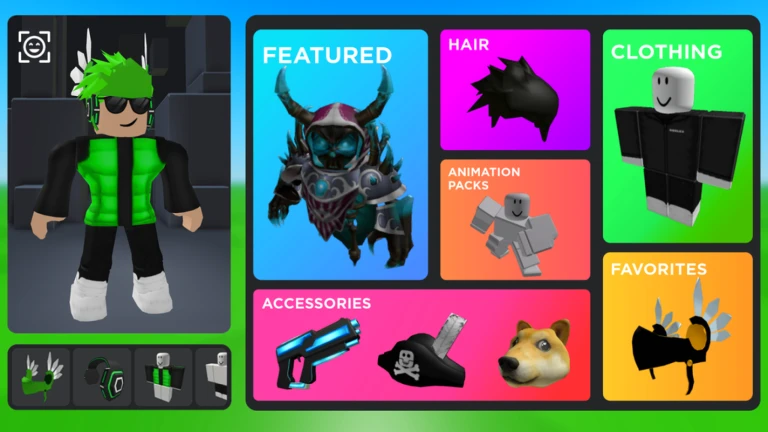
Catalog Avatar Creator is a Roblox game created by itsMuneeeb that has been gaining popularity among platform players. On this page, you will find complete information about the game, as well as updated content for those who want to better understand how it works and make the most of the experience.
There are Roblox Codes working right now for Catalog Avatar Creator.
👉 View active codes now
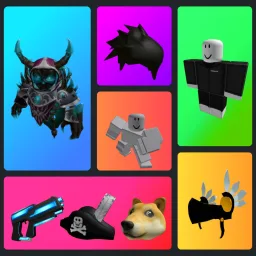
Catalog Avatar Creator is one of the most popular games on Roblox for those who love customizing avatars. In it, players can test any item from the catalog — clothes, accessories, animations, bundles, and even premium items — before buying. It’s a perfect environment to experiment with combinations, create unique styles, build complete characters, and test rare visuals without spending Robux.
What is Catalog Avatar Creator?
Catalog Avatar Creator is a game focused solely on avatar customization. It allows you to test thousands of items from the Roblox catalog without spending Robux, making it ideal for those who want to create perfect combinations before making a final purchase. It is widely used by content creators, players who enjoy virtual fashion, and users who want to make their avatar more stylish.
Among the main highlights of the game are:
- access to almost all items from the Roblox Catalog,
- simple and fast interface for changing items,
- support for 2D, 3D, and Layered Clothing,
- areas for photos, poses, and animations,
- unlimited combinations with no restrictions,
- testing items before spending Robux.
How to play Catalog Avatar Creator
1. Open the customization menu
The main menu allows you to add clothes, accessories, animations, and even change the avatar's body.
2. Search for catalog items
Use the search bar to find any item available in the Roblox Catalog and test it instantly.
3. Combine clothes and accessories
Create complete styles by mixing clothes, hats, hair, glasses, backpacks, and body items.
4. Test animations and bundles
The game allows you to use walking, running, jumping animations, and various poses.
5. Save your favorite combination
You can save styles for later reference or replicate them on the official avatar in your Roblox profile.
Main item categories in Catalog Avatar Creator
| Category | Description |
|---|---|
| Clothes | T-shirts, pants, classic shirts, Layered Clothing, and complete outfits. |
| Accessories | Hats, hair, glasses, masks, ears, backpacks, wings, and more. |
| Bundles | Complete body packages, including animations and special clothes. |
| Animations | Items that define how your avatar walks, runs, swims, and jumps. |
| Bodies | R6, R15 models, and complete 3D avatars. |
Tips for creating amazing avatars
1. Combine 2D and 3D accessories
2D clothing items pair well with modern 3D accessories.
2. Use Layered Clothing to create more natural clothes
This type of clothing adjusts to the body and allows for realistic effects.
3. Mix colors carefully
Complementary colors often create visually pleasing avatars.
4. Test styles before buying Robux
You avoid regrets and create perfect combinations.
5. Use photo mode
The game has special areas for taking professional screenshots.
Special features of Catalog Avatar Creator
- Quick editor for instant item changes.
- Support for Layered Clothing (modern 3D clothes).
- Map with built-in photo studio.
- Custom poses and animations for screenshots.
- Limited and unlimited accessory testing.
- Combinations saved locally in the game.
Why is the game so popular?
The popularity of Catalog Avatar Creator comes from the total freedom it offers. Players can create unique avatars, test items before buying, and create styles that are impossible to visualize just from the catalog page. Additionally, content creators use the game as a visual tool for thumbnails, videos, and posts.
Tips for beginners
- Try accessories of different sizes to create unique effects.
- Avoid overloading with too many head items to prevent visual clutter.
- Use the studio to test poses before saving the combination.
- Seek inspiration from other players' avatars on the server.
- Take the opportunity to test premium items before spending Robux.
Check out our code center updated daily: Click to access.
Summary
The Catalog Avatar Creator allows you to try out many different avatar/catalog items for free. This includes accessories, hats, limitations, hair combos, bundles, animation packs, and much more! You can also browse an ever-growing collection of over 30 MILLION community-created clothes and save all the avatars you created in the experience!
Main features
- All purchases made in the game will be available in your Roblox inventory and can be used in all games.
- Join our Roblox Group here: https://www.roblox.com/groups/15102943
- Winner of the Roblox Innovation Award "Best Use of Fashion" (2023 and 2024)
Frequently Asked Questions about Catalog Avatar Creator
Is Catalog Avatar Creator official from Roblox?
No. The game is made by independent developers but uses official items from the Roblox catalog.
Can I test any item from the catalog?
Yes! Almost all items in the catalog can be tested for free within the game.
Does the game help choose clothes before buying Robux?
Yes! It’s the safest way to see how an item looks on your avatar before spending Robux.
Does the game have modes other than customization?
The main focus is customization and photography, but some servers offer explorable areas and themed rooms.
👉 Also check our complete page of Roblox codes.
Official statistics and data for Catalog Avatar Creator
Below you can see the main official data for Catalog Avatar Creator within the Roblox platform. This information helps you understand the game’s performance, popularity and level of player interest over time.
-
👣 Total visits: 5.300.385.331
This number represents the total number of visits Catalog Avatar Creator has received since it was published on Roblox. In other words, Catalog Avatar Creator has already been accessed 5.300.385.331 times by platform players. The higher the number of visits, the greater the game’s popularity and continued community interest. -
⭐ Favorites: 4.606.531
This value indicates how many players have added Catalog Avatar Creator to their favorites list. In other words, 4.606.531 users have shown direct interest in the game, which usually indicates good engagement and community approval. -
🗓️ Creation date: 26/06/2021
Catalog Avatar Creator was created on 26/06/2021 and became available on Roblox from that date. This shows how long the game has been active on the platform and helps understand its trajectory since launch. -
🔄 Last recorded update: 11/06/2025 10:21
The last update for Catalog Avatar Creator took place on 11/06/2025 10:21. This means the game received changes or improvements on that date, indicating whether it remains active, supported and updated with new content for players.
By analyzing this data, it is possible to get a clearer view of the relevance of Catalog Avatar Creator within Roblox. Games with many visits, a high number of favorites and recent updates usually maintain active communities and greater longevity on the platform.